# Introduction
## Our Mission
De.Fi strives to bring DeFi to all, ensuring anyone can make the most out of the Web3 financial revolution, while investing confidently without the fear of getting rekt.
By becoming essentially the Robinhood of DeFi, we can become bigger and better than our Web2 counterparts, due to no nationalized financial restrictions or adherence to legacy technologies.
## **The** De.Fi **Community**
Our community is comprised of DeFi users of all levels of experience: professional investors, traders, experienced DeFi connoisseurs, large whales, degens, or even newcomers to this space.
Our community, which has grown considerably since our launch, makes the most out of the elements in our ecosystem:
* **Dashboard:** A security-oriented [**page**](https://docs.de.fi/dashboard/the-defi-dashboard) for users to manage their assets, while being aware of all their associated risks and being able to manage them.
* **Security Toolkit:** A set of tools to give users as much control of their own safety as possible. This includes our [**Shield**](https://docs.de.fi/security-toolkit/shield) functionality, [**Smart Contract Scanner**](https://docs.de.fi/security-toolkit/scanner), [**Impermanent Loss Calculator**](https://docs.de.fi/welcome/broken-reference) and more always being developed.
* **Audits:** We not only perform our own audits, but we make all audits from all auditors available on our [**Audit Database**](https://docs.de.fi/audits/audit-database), as well as a detailed record of all protocol hacks and exploits on any of our supported chains on our [**Rekt Database**](https://docs.de.fi/audits/rekt-database).
## Official Links
* [**Website**](https://de.fi/)
* [**Twitter**](https://twitter.com/DeFi)
* [**De.Fi Blog**](https://de.fi/blog/)
* [**Telegram**](https://t.me/defi_ann)
* [**YouTube**](https://www.youtube.com/channel/UCMCGy1ExKesm8YlcKGAFRGA)
* [**Whitepaper**](https://de.fi/whitepaper.pdf)
# Getting Started
Our platform provides a multitude of utilities in all aspects of DeFi, so it may be a little hard to grasp all that we offer. Here's a quick first guide to get you started:
## Step 1 - Connect Your Wallet
Through your [**address book**](https://docs.de.fi/dashboard/the-defi-dashboard/address-book) or the top-left of our app, connect your wallet! We support all types of browser wallets, on a ton of different blockchains.

Alternatively, you can just tell us the address of a wallet you'd like to track through the [**address book**](https://docs.de.fi/dashboard/the-defi-dashboard/address-book). You can even add multiple wallets and create unique bundles of wallets to switch to any time.
## Step 2 - Keep Track of Your Balances
Through De.Fi's [**Dashboard**](https://docs.de.fi/dashboard/the-defi-dashboard), you can easily keep track of any of your tokens, NFTs, provided liquidity or otherwise funds in any of the dozens of blockchains we support.
On your home page, you'll see a general overview of all your assets. For a more detailed look into each type of asset, refer to the 'Investment' section of our sidebar. There you will find the following:
#### Wallet Balances
A quick way to see what tokens you are holding on any of your wallets, on any of our supported blockchains, is the [**Wallet**](https://docs.de.fi/dashboard/the-defi-dashboard/wallet) page. This includes any assets currently sitting in your wallet, meaning any tokens not staked, deposited or otherwise interacting with any DeFi protocols.
#### Deposited Balances
If you've deposited liquidity or staked assets anywhere, the [**Deposit**](https://docs.de.fi/dashboard/the-defi-dashboard/deposit) page is where you'll get detailed insight into your balances along with any outstanding staking rewards.
This not only includes deposits in the hundreds of dapps we support, but also native staking, such as staking ETH on Ethereum, AVAX on Avalanche, etc.
#### Lent Balances
Using a lending market to lend and borrow tokens? The [**Lending**](https://docs.de.fi/dashboard/the-defi-dashboard/lending) page is where you'll get detailed info into what you have lent, and what you have borrowed, alongside the APRs of any of these interactions on any of our supported platforms, and any outstanding incentive rewards.
## Step 3 - Stay Safe
At De.Fi, we provide you with as many tools as possible to ensure you can stay informed and safe throughout your decentralized investing journey. Check them out below:
### Our Security Toolkit
#### Checking For Threats
De.Fi's [**Shield**](https://docs.de.fi/security-toolkit/shield) page can quickly scan your wallet addresses to see if you have interacted with any at-risk smart contracts, and if you have any exposure to possible exploits.
These can include a ton of different events, such as an ERC-20 approval given to a high-risk contract, funds in a contract that can be upgraded without a timelock or multi-sig, etc. Our scanner will catch these all and let you know how to deal with any potentially risky scenario.
#### Scanning Smart Contracts
Through our [**Scanner**](https://docs.de.fi/security-toolkit/scanner), you can quickly scan any smart contract to ensure it is safe to use, which is especially important if the contract hasn't been audited.
### Our Databases
Before investing in any DeFi protocol, you should definitely give it a search in our databases:
#### Audit Database
Making sure a project has been thoroughly audited is the first step to investing safely in DeFi.
Our [**Audit Database**](https://docs.de.fi/audits/audit-database) will let you know if that protocol has been audited in the past. Not only that, but it will tell you when it was audited, by whom, the coverage of the audit and give you unrestricted access to the audit report itself.
#### Rekt Database
In the wild west of DeFi, it is important to keep track of the exploits that occur in order to be able to prevent them in the future.
Our [**Rekt Database**](https://docs.de.fi/audits/rekt-database) does exactly that. Also check if the protocol you want to invest in has a history of exploits in their smart contracts, or if the auditing firm that performed its audit hasn't had a ton of exploits on its audited contracts.
# The De.Fi Dashboard
Our dashboard is the most central element to De.Fi’s ecosystem. Not only is it an efficient cross-chain asset management solution with a plethora of useful features, it also combines this with built-in safety infrastructure to keep users aware of the risks associated with their many assets and/or positions, along with how to handle them.
{% hint style="success" %}
Check out all the blockchains we support [**here**](https://docs.de.fi/dashboard/the-defi-dashboard/supported-blockchains)!
{% endhint %}

## Dashboard Tools
### Address Book
The [**Address Book**](https://docs.de.fi/dashboard/the-defi-dashboard/address-book) enables you to switch between tracking any wallet or group of wallets you'd like. Connecting to new wallets, adding new ones or managing your previously added wallets is made extremely easy here.
### Wallet Balances
A quick way to see what tokens you are holding on any of your wallets, on any of our supported blockchains, is the [**Wallet**](https://docs.de.fi/dashboard/the-defi-dashboard/wallet) page. This includes any assets currently sitting in your wallet, meaning any tokens not staked, deposited or otherwise interacting with any DeFi protocols.
### Deposited Balances
If you've deposited liquidity or staked assets anywhere, the [**Deposit**](https://docs.de.fi/dashboard/the-defi-dashboard/deposit) page is where you'll get detailed insight into your balances along with any outstanding staking rewards.
This not only includes deposits in the hundreds of dapps we support, but also native staking, such as staking ETH on Ethereum, AVAX on Avalanche, etc.
### Lent Balances
Using a lending market to lend and borrow tokens? The [**Lending**](https://docs.de.fi/dashboard/the-defi-dashboard/lending) page is where you'll get detailed info into what you have lent, and what you have borrowed, alongside the APRs of any of these interactions on any of our supported platforms, and any outstanding incentive rewards.
### NFT Portfolio
Your [**NFTs**](https://docs.de.fi/dashboard/the-defi-dashboard/nfts) can easily be browsed here, regardless of what chain they are in. Info such as marketplace value, recent sales, floor price, collection details and more can be seen on the more popular collections and tradeable tokens.
### Exploring New Opportunities
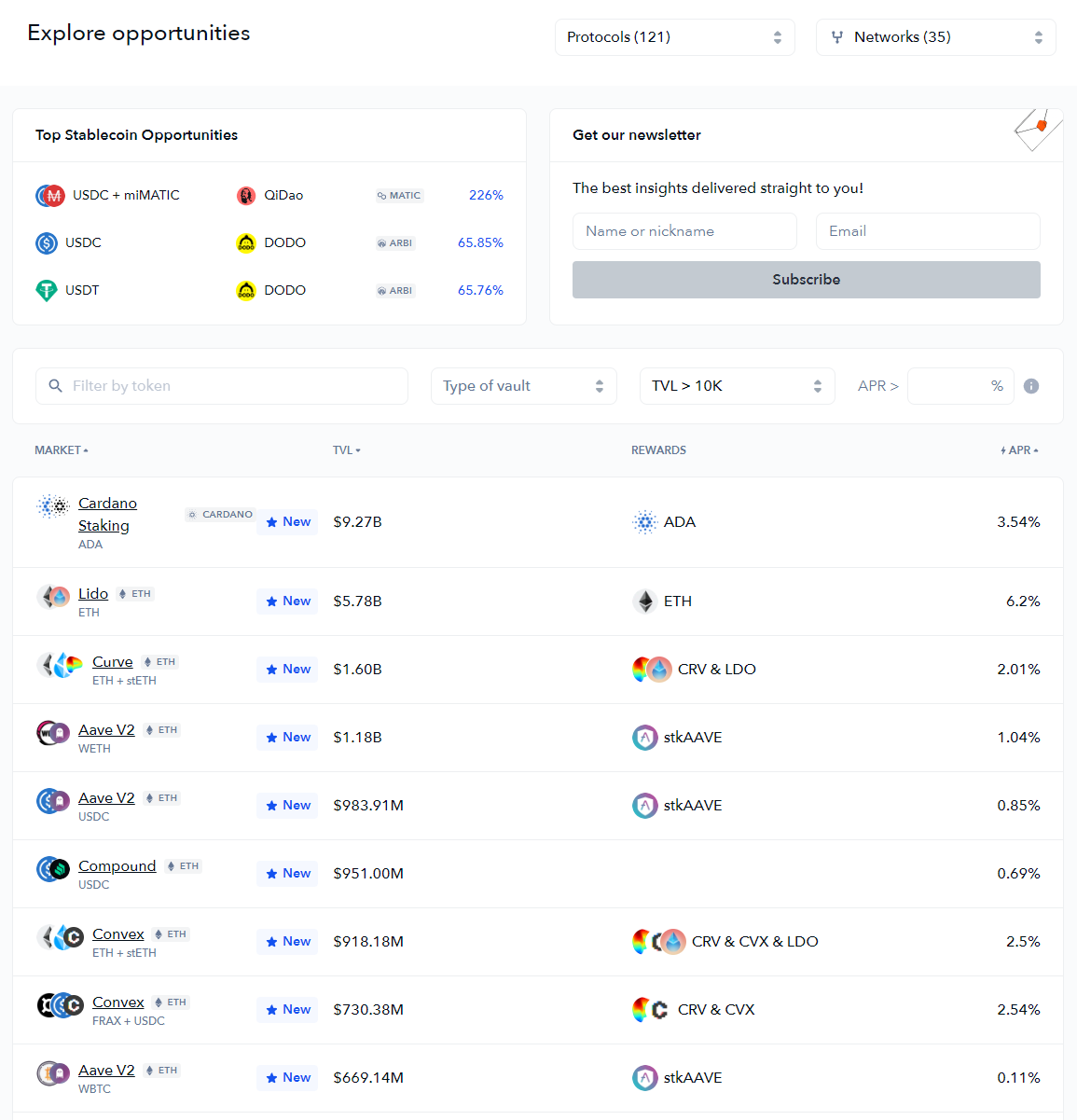
If you're unsure where to deposit your funds, the [**Explore Opportunities**](https://docs.de.fi/dashboard/the-defi-dashboard/explore-yields) page can help you find what pools, vaults, lending markets or otherwise interesting opportunities are available in DeFi for your assets.
# Address Book
De.Fi’s [**address book**](https://de.fi/address-book) is a quick and easy way to manage all your wallets and/or any wallets you are interested in keeping track of, regardless of whether they are from an EVM-compatible chain or not.
## Adding Wallets
There are two ways to add a wallet to track and use throughout De.Fi's many pages and tools:
#### Option 1 - Connecting To Your Wallet
By clicking the 'Connect Wallet' button, you will be prompted to enter what wallet you'd like to connect with. Depending on what type of blockchain you intend to use, you will have many options to choose from.

For EVM-compatible chains, for example, you'll be able to pick between MetaMask, WalletConnect, Coinbase Wallet or a dozen other alternatives.
Once you have selected your wallet preference, your wallet will likely prompt you to connect to our site. Accepting such prompt will connect your wallet to De.Fi. This **does not allow** us to make any transactions on your behalf; only see info such as your address and balances from your wallet.
#### Option 2 - Entering Any Wallet's Address
If you do not have access to the wallet you are trying to keep track of or just want to easily add multiple wallet addresses, you can simply enter any wallet's address to your watchlist through the Address Book page.

Type the address of your wallet on the textbox to the right and click on 'Add to watch'. This can be your actual wallet address or an ENS domain if you have one setup.
## Removing Wallets
To remove your wallet from your watchlist, simply hover over it to see a bin icon:

Clicking that icon will instantly remove the wallet from your watched wallets.
## Managing Bundles
You can create a bundle of wallets to track multiple wallets at any given time. To do so, simply click the 'Create Bundle' button on your Address Book:

Doing so will prompt you to give a name to the bundle, and choose which wallets you want to add to the bundle:

If you don't see a wallet you want to add to your bundle there, make sure you have it either connected or in your watchlist (refer to [**Adding Wallets**](#adding-wallets)).
Hovering over the bundle at any point will show you a gear icon, which you can click to return to the 'Manage Bundle' popup. There you can add more wallets to your bundle, remove any unwanted wallets, rename your bundle or delete it entirely.

# Wallet
Your wallet page is the easiest way to simply view all the tokens you are holding in your wallet. This means assets that are currently not interacting with any DeFi protocol, or staked in any manner.
## Checking Your Wallet
Here you can easily view any asset's price, how much of the asset you have available in your wallet as well as its calculated value in USD:

## Adding Missing Tokens
If the page is missing some of your more obscure tokens, worry not; they can easily be added by typing in its network and address:

The other two fields should fill in automatically. If not, you may be required to input those manually, or the address you are trying to input may not be a token after all.
# Deposit
De.Fi's deposit page is where you can find all the details of any of your staked assets. This includes any assets staked in DeFi protocols, as well as native staking in any of your favorite Proof of Stake blockchains that we have support for.
## Checking Your Deposited Assets
If you have tokens deposited into a liquidity pool on Uniswap, for example, you'll be able to quickly see all the information you need about your deposit:

This includes all the data on the pool's underlying tokens, their prices, the yield you are getting from the pool as well as any rewards that are available to claim. Soon we'll also allow you to claim such rewards directly on our app, saving you the time taken to navigate to all the dApps you interact with on a daily basis.
## Native Staking Support
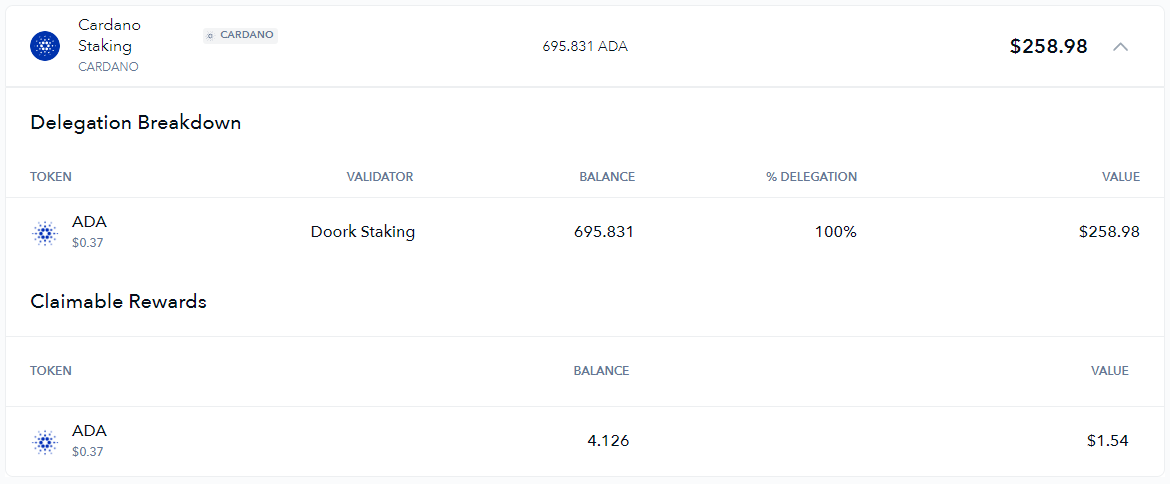
Similarly to staking in DeFi protocols, we support native staking and/or delegating as well:
In the example above we have an ADA delegation to a validators on Cardano. The deposit page will clearly display your delegations, their value and underlying token price as well as any outstanding rewards you've earned throughout your stake!
# Lending
If you're utilizing any lending markets, you'll be able to use our lending page to quickly view all your investments in one place.
## Checking Your Collateral
At the top of the page you can see the total amount you have provided as collateral, as well as the amounts you have borrowed:

This can be a quick way to check that your collateral is in check. If the 'Net Worth' value is lower than you expected, you might want to check that your collateral didn't lose too much value, otherwise you could risk liquidations on any platform you have assets in.
## Viewing Your Positions
Scrolling down to the page's main content, you'll see details of any of your positions in lending markets of any of the blockchains we have support for. For example, below is an Aave V2 position on Polygon:

For every one of the protocols you are interacting with, you'll be able to see all the tokens you have supplied, along with their current values and respective yields. Furthermore, any tokens you have borrowed will be displayed below alongside their interest, as well as any rewards that you can claim.
# NFTs
{% hint style="warning" %}
Our NFT page is currently unavailable as we are working on improving it.
{% endhint %}
Find yourself to be quite the NFT connoisseur? De.Fi's NFT portfolio page makes it easy for you to keep track of your collection. We offer a quick way to check out all the details of any of your NFTs in one place, calculate your net worth based on floor prices, share your NFTs with others, and a lot more.
## Browsing Your Collection
By navigating to the NFTs page on our app's sidebar, you will be able to see all NFTs owned by your wallet or bundle of wallets that you've selected:

The search bar allows you to search for any NFT via name or collection, and the filters on the right allow you to filter your portfolio by NFT collection, or sort them by price in descending or ascending order.
## Checking Out Your NFTs
By clicking on any NFT, you can view any details available for it, which will largely depend on what type of NFT you have. For popular collections, you can expect a ton of interesting info such as the item's traits, collection details, and other identifying information:
### NFT Traits

These are traits inherent to your NFT, which are usually determined when they are first minted. Some NFTs have many different traits with specific rarities to each, while some collections may offer only a couple important traits to any given piece.
Depending on the rarity of your NFT's traits, you might have a very expensive piece in your hands! The floor price of each trait will be listed in this screen, allowing to easily see what are the most sought-after traits of your token.
### Collection Info

The 'Collection' tab on any NFT will give you a description of the collection an NFT is part of, if any. We'll also provide you with links to the collection's website, marketplace on OpenSea as well as any additional relevant socia media links.
### Other Details

The 'Details' tab will provide you with any other relevant information regarding your NFT, such as the address of its smart contract, the blockchain it was deployed in and its unique token ID. If the token follows a common standard, we'll also be sure to include it in your NFT's details.
### Sharing Your NFT

The icons on the top right of any NFT also allow you to quickly grab a link to your NFT, or instantly share it on any social media of your choosing!
# Explore Yields
Unsure where to deposit your tokens or what is available out there in the DeFi space? This page is for you. The Explore Yields page is the perfect place to search for exactly what you are looking for.
## Searching For Pools
Through our extensive listings, you can search by any criteria that is most important to you. If you are a fan of a specific network, for example, feel free to search for pools on that network exclusively, or choose your favorite multi-chain protocol to search for.
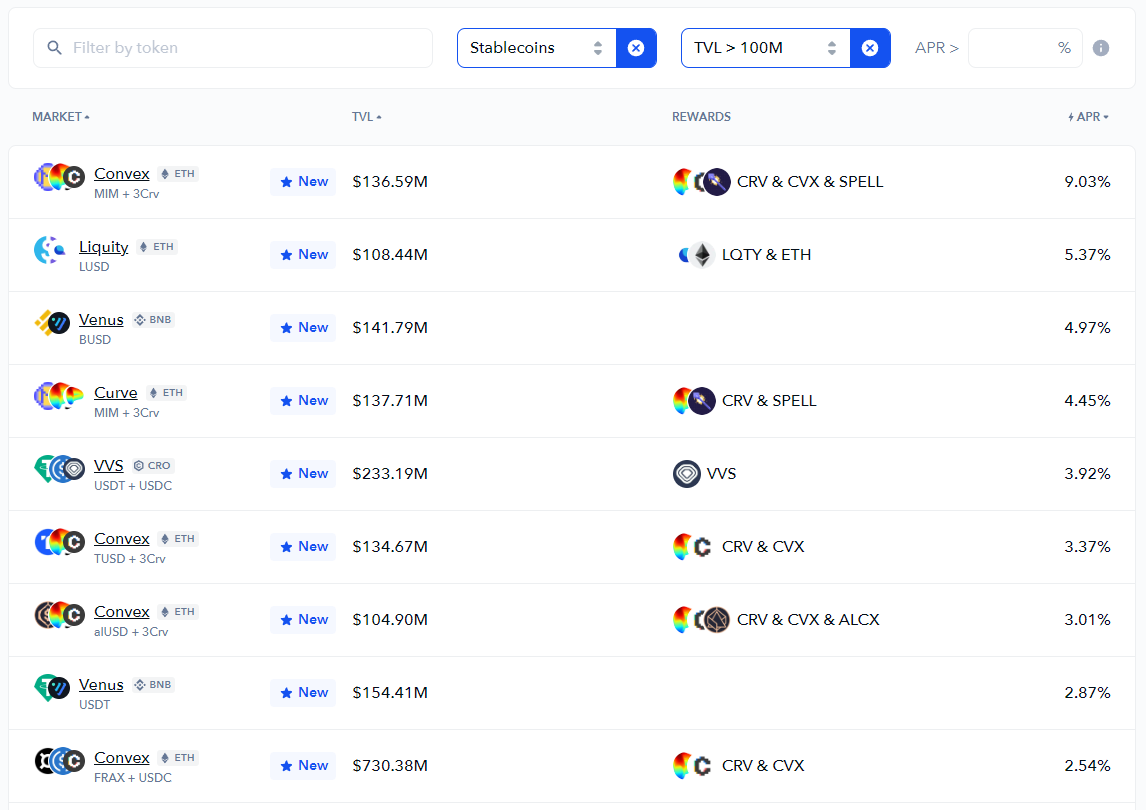
You can be as specific as you'd like. For example, you may be looking for the following:
* Stablecoin-only pool, due to your particular risk profile.
* A TVL of at least $100M, in order to really filter only for the most trusted and utilized protocols.
* Sorted by APR, to net you decent profits throughout the year.
You can click on any of the pools found through our app, netting you the quickest way to make use of all the yield opportunities available in DeFi.
# Supported Blockchains
We're proud to support a large number of blockchains providing the best DeFi services for our community.
{% hint style="info" %}
Check out our always up-to-date page [**here**](https://de.fi/integrations) to also see the protocols supported for each of these chains!
{% endhint %}
Below is a list of all the blockchains we support:
* Ethereum
* Polygon
* Binance
* Arbitrum
* Optimism
* zkSync Era
* Fantom
* Avalanche
* Base
* Cronos
* Celo
* OKTChain
* Klaytn
* Gnosis
* Moonbeam
* Cosmos
* Osmosis
* Akash
* Agoric
* Kava
* Kujira
* Juno
* Secret
* Sifchain
* Stargaze
* Thorchain
* Cardano
* Solana
* Bitcoin
* Dogecoin
* Tezos
* Binance.com
* OKX.com
* Huobi
* Coinbase.com
* Kraken
* Bitfinex
* Mexc
{% hint style="info" %}
Are we missing one of your favorite blockchains? Let us know by reaching out through our community channels!
{% endhint %}
# Supported Protocols
Among our dozens of supported blockchains, we also support hundreds of protocols (decentralized applications) built on top of them.
See [**here**](https://de.fi/integrations) a full and up-to-date list of all the protocols we support.
# Shield
De.Fi's [**Shield**](https://de.fi/shield) is the best way to ensure that any assets in your wallet(s) are safe. This means we are always systematically scanning the smart contracts you have interacted with, any token contracts you are currently holding and any approvals you have granted to third-party contracts on any of our 10+ supported blockchains.
## Approval Checks
Through checking smart contracts you have interacted with, we are able to advise you on any outstanding approvals you have granted to any of them, and how much risk you are undertaking by having such tokens approved.
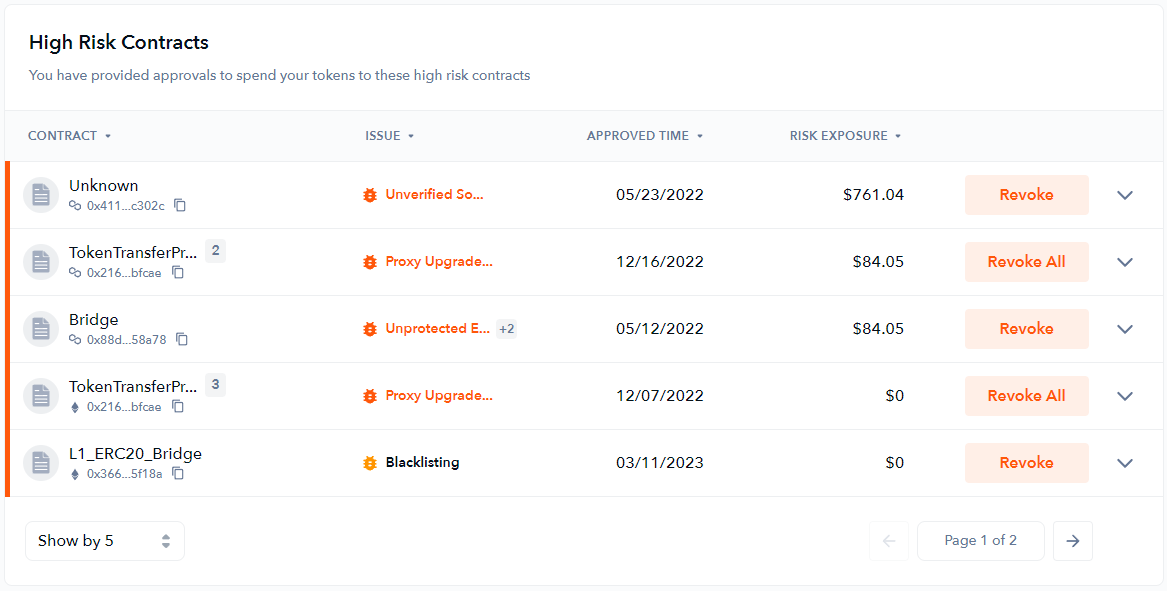
Approvals given to contracts that are possibly exploitable will be clearly marked and displayed in our **High Risk Contracts** section, along with a simple explanation of what the underlying issue is:
Selecting **Revoke** on any past approval will allow you to quickly and easily set the approval to 0, disallowing the contract from transferring any tokens on your behalf:

{% hint style="info" %}
Our [advanced mode](#advanced-mode) can aid you in more specifically setting desired approval amounts.
{% endhint %}
## ERC-20 Token Risks
By analyzing any tokens in your wallet(s), we highlight tokens that may be vulnerable to exploits on our **High Risk Tokens** section, present an explanation as to why that is the case, as well as how much exposure you have to any of these tokens:

Selecting **Swap** will allow you to easily and safely swap the vulnerable tokens out of your wallet.
## NFT Safety
Similarly to our contract approval checks, the Shield page will clearly denote any NFTs (ERC-721 or ERC-1155 contracts) in your wallet(s) with outstanding approvals to exchange, trading or marketplace contracts that have been detected as vulnerable for any reason displayed.

Through the **Revoke** option, those approvals can also be easily nullified.
## Advanced Mode
While by default our interface will only display some of the most high risk security concerns, activating Advanced Mode enabled you to browse through different levels of issues identified by our Shield and take a deeper dive into securing your wallet's safety.

**Critical Risk** issues (shown in dark red) are vulnerabilities that should be dealt with immediately.
**High Risk** issues (shown in red) are usually exploitable vulnerabilities in any given contract which may require immediate attention.
**Medium Risk** issues (shown in orange) can refer to non-vulnerability issues, but perhaps issues of an owner's control over a contract, or ways with which permissions may be used nefariously.
**Low Risk** issues (shown in green) refer to small points of concern among a specific contract, such as loss of precision on specific calculations, lack of events emitted during important transactions, etc.
**Informational** issues are anything else useful to denote, but with no particular emergency or vulnerability to patch. These can be issues such as outdated solidity versions, sub-standard code or usage of some particularly unreliable functions.

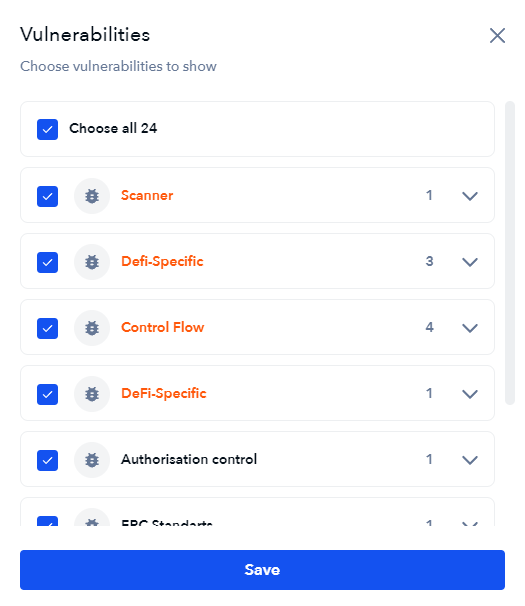
You may also choose to filter through issues, in order to only disclose vulnerabilities you are personally concerned with:
Filtering options for the issues found with your wallet(s)
With advanced mode enabled, you will also have the option to alter any token approval rather than outright revoking it. This is particularly useful in other to curb unlimited allowances you have set in the past:

# Scanner
De.Fi's [**smart contract scanner**](https://de.fi/scanner) can be used to quickly gather a comprehensive analysis of any smart contract on our 10+ supported blockchains. This is to ensure that the contracts you plan on interacting with are safe, without having to rely on often misleading audits that most often lack proper coverage.
## Our Features
#### Expansive Vulnerability Coverage
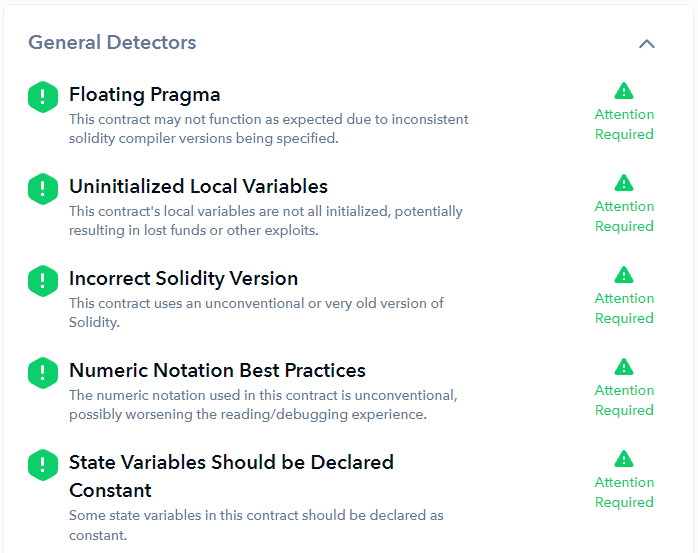
The scanner doesn't only scan for the most superficial exploits and threats like reentrancy attacks, unchecked transfers, etc. Any exploit or vulnerability discovered in the recent years has been included and are checked for. This includes anything from Solidity best practices to ERC standards, proper control flow or checking proper privileged function setups. For example:
Contract issues detected through the scanner
#### Simple & Informative Security Score
Our scanner generates a simple security score to quickly infer the riskiness of any given contract.
#### Fast Scanning
In less than a couple seconds you are able to have all the details regarding any contract you'd like, with likely better coverage than most audits out there.
#### Detailed Findings
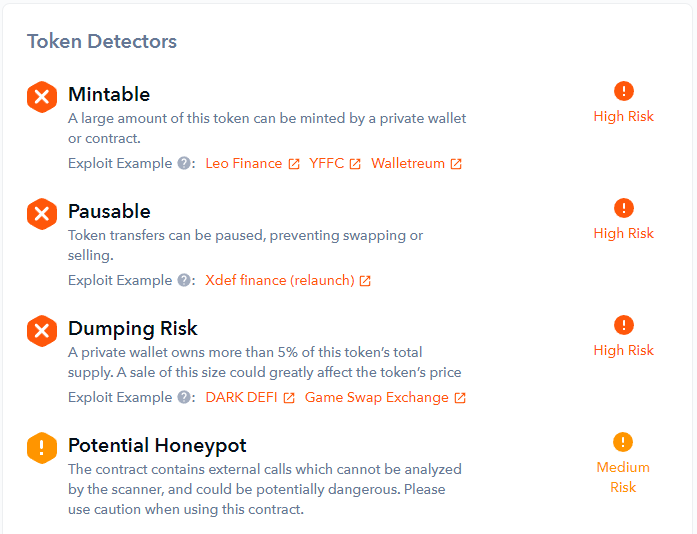
Alongside the security score, our scanner provides you with detailed lists of findings for any given contract, provides examples where appropriate and explains what the findings entail.
For token contracts, for example, you could expect it to easily detect any concerns such as the following:
Issues found on a token contract
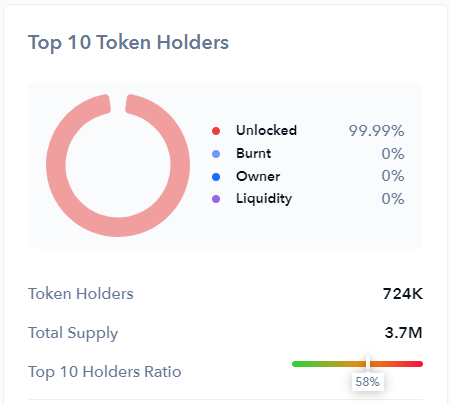
#### Extra Token Details
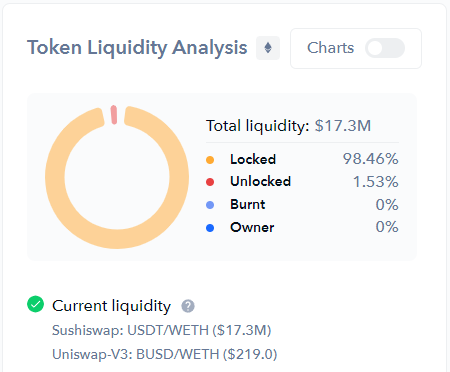
For more well-known and popular tokens, our scanner also provides you with extra information such as token holder or liquidity analysis:
# DEFI Token
The DEFI token is the De.Fi's native governance token, and is present on many blockchains.
With the DEFI token, users can take part in our ecosystem, provide their vote on any governance proposals submitted by our community, as well as benefit from other exclusive features within our platform.
The token's total supply is determined by an annual inflation rate, and the maximum supply of 3 billion DEFI is targeted to be reached within 60 months. Token's official contracts are:
* **ETH:** 0X6B0FaCA7bA905a86F221CEb5CA404f605e5b3131
* **BSC:** 0X6d106C0B8d2f47c5465bdBD58D1Be253762cBBC1
* **SOL:** HXwh9i8D1LKkVK8WfMjFPyiyVZ4Auh9aLD5ut4LCRqqR
## Token Distribution

## Token Utility
The DEFI token provides the following utility to its holders and the De.Fi community:
* **Product Access -** DEFI holders have full access to any of De.Fi's products, such as our[ audit database](https://docs.de.fi/audits/audit-database),[ Rekt database](https://docs.de.fi/audits/rekt-database),[ approvals page](https://docs.de.fi/security-toolkit/shield) and[ smart contract scanner](https://docs.de.fi/security-toolkit/scanner).
* **App Discounts** - DEFI holders have discounts when utilizing any De.Fi services, such as our multi-harvesting service.
* **Exclusive Chat Access** - DEFI holders have access to some of our internal channels, where our most committed community members can chat with our team at a more intimate level.
* **Partner Benefits** - The DEFI token can be used at any of our partners' liquidity pools or otherwise any other related DEFI token staking options available.
* **De.Fi Chain Contract Queries** - In order to[ request smart contract data](https://docs.de.fi/defi-chain/infrastructure#queries) from the De.Fi Chain, one must spend some DEFI for each query.
* **Becoming An Indexer** - In order to become an[ indexer](https://docs.de.fi/defi-chain/infrastructure#indexers) in the De.Fi Chain, one must stake DEFI for a certain length of time.
## How To Earn DEFI
Other than buying DEFI on the open and decentralized market, one can earn DEFI by any of the following activities:
* Contributing to our code scanning codebase.
* Providing liquidity for DEFI pools.
* More ways to earn DEFI tokens will be announced soon.
# Governance
Through our governance systems, users can propose anything from miscellaneous changes, feature requests or even redefining any of De.Fi's underlying mechanisms. When voting, users have an option to vote for, against, or abstain from voting on any given proposal.
## Voting Process

# Audit Database
De.Fi's [**Audit Database**](https://de.fi/audit-database) is the world's most comprehensive database of all smart contract audits performed to date. This of course includes any of our own audits, as well as audits from other major auditing firms such as Quantstamp, PeckShield, Chainsulting, Open Zeppelin, ConsenSys, CertiK and many, many more.
{% hint style="success" %}
Our database is updated daily with any new audits being completed, so our list of tracked auditors is constantly growing.
{% endhint %}

## Audit Search
Searching for a project's audit has never been easier. Through our Audit Database you are simply search for a project's name and easily find all their audits. You may filter by chain or auditing firm if you wish to.
For example, searching for "Aave" will get us the following results:

You are able to quickly see when and by whom the project was audited by, as well as download any relevant reports from each audit.
{% hint style="info" %}
You can also search for a specific auditing firm to find all their different audits!
{% endhint %}
# Rekt Database
Striving to remain the biggest contributor to the safety of the DeFi community, De.Fi has developed a most comprehensive database of all exploits, attacks, exit scams and other instances of projects getting 'rekt'. Our [**Rekt Database**](https://de.fi/rekt-database) offers a way to quickly search through these.
At the database's top section, you can see an overview of funds lost and/or recovered throughout the industry's many hacks and exploits. Choose your preferred timespan or chart type to see this information in more detail, or keep an eye out for the "Rekt of the Month" to see the most recent occurrences added to our database.
## Exploit Search
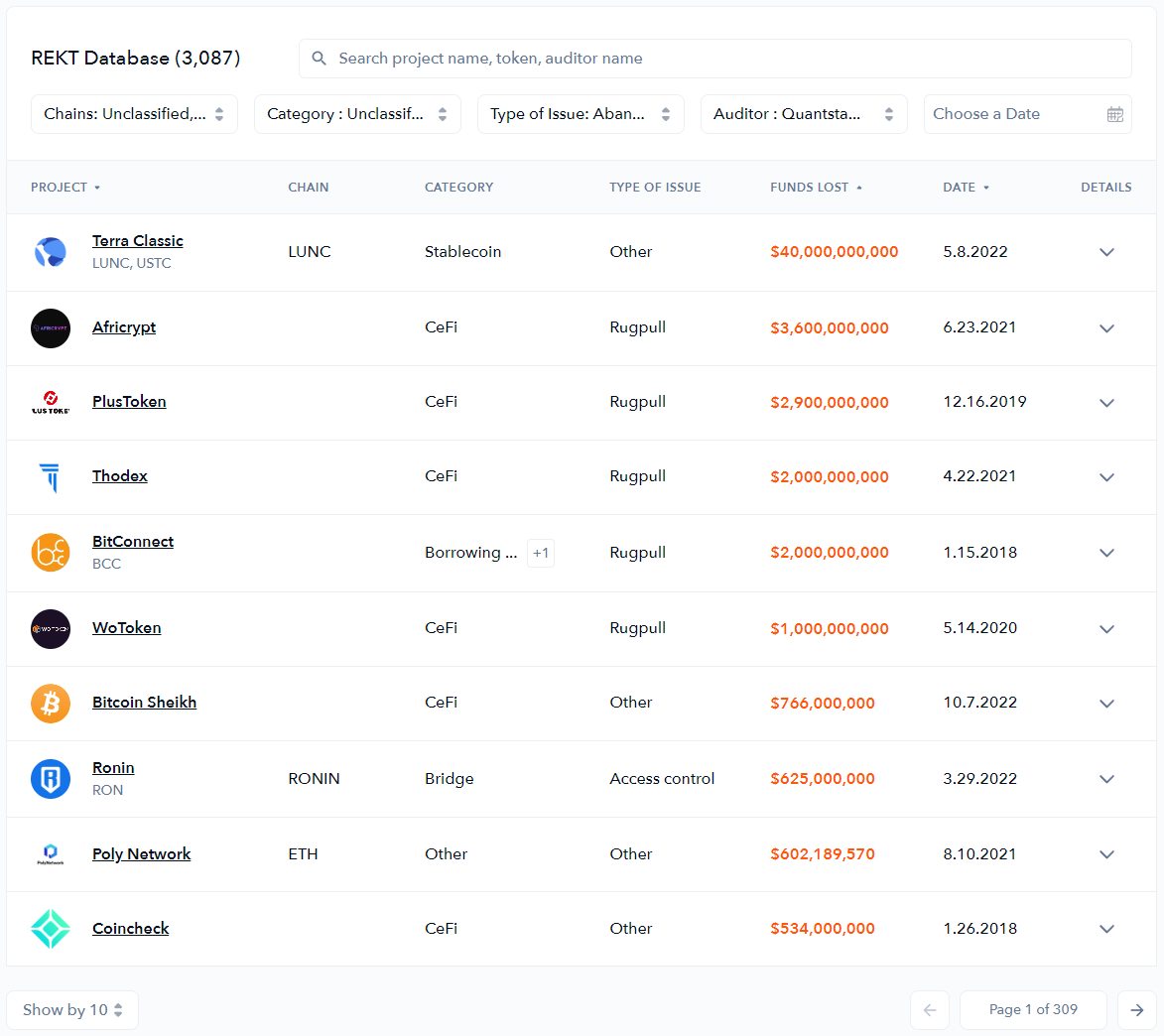
Through our Rekt Database, you can search for any project to find out if it has been exploited, rugged or has experienced any other sort of worrisome occurrence. By default, the page shows you the ranking of the exploits with the most financial impact (most funds lost):
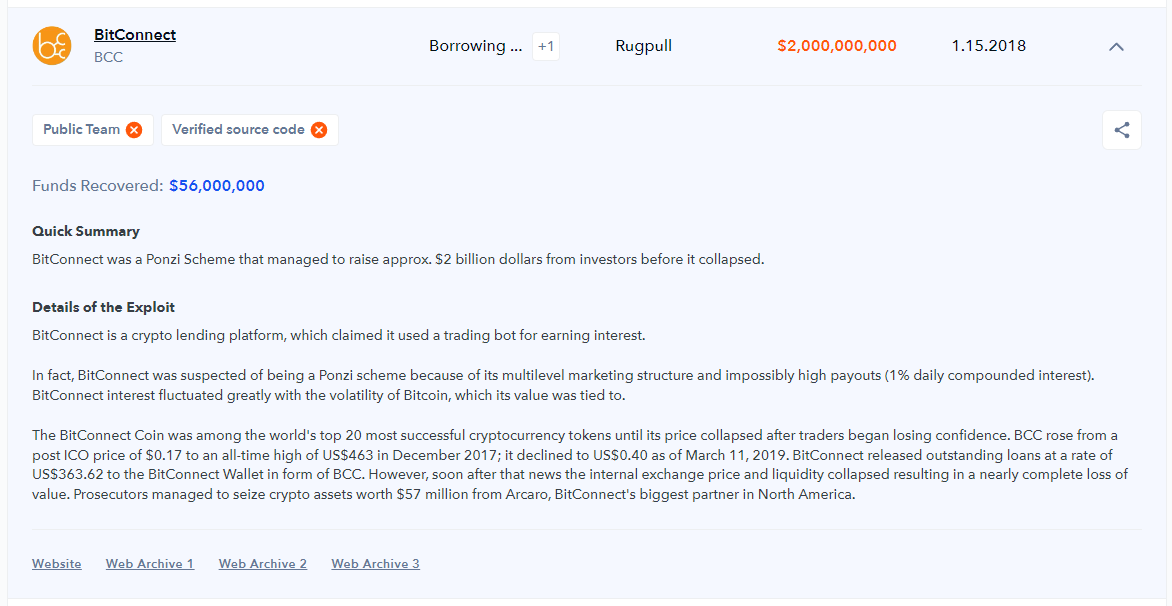
By clicking on the 'Details' column next to any project, you can view a detailed summary of each occurrence, including the affected addresses, how the event took place, etc:
Through our various filters, you can search for a hack or exploit by name or date, as well as the following:
#### Chain
This is the blockchain where the exploit took place. In many cases, an exploit can take place in multiple chains!
#### Category
This is the category of the platform that suffered the exploit or hack. Examples include:
* NFT - Includes NFT collections as well as marketplaces.
* Bridge - Any cross-chain bridges that allow users to move from one chain to another.
* CeFi - Includes centralized exchanges or other centralized products utilizing DeFi primitives.
* DEX - Any decentralized exchange or trading platform.
* Gaming/Metaverse - Gaming-specific platforms!
* Stablecoin - Any protocol supporting a stablecoin regardless of backing.
* Token - Any ERC-20 or similar token that doesn't involve its own platform in other categories.
* Yield Aggregator - Auto-compounders, farm optimizers, etc.
* Borrowing & Lending - Lending markets such as Aave or Compound.
* Other - DAOs, insurance protocols, generic infrastructure or any other platforms that don't fit any other categories!
#### Type
This is the type of scam, exploit or hack that took place. Examples include different types of exit scams as well as exploits like reentrancy attacks, flash loans or simply access vulnerabilities.
#### Auditor
This is the auditing firm that audited the affected contracts, if any. This can be useful to view a track record of any one given auditing firm, but keep in mind that not all audits cover everything in a given protocol.
# API
The De.Fi API is the easiest way to integrate our expansive functionality into any app of your choosing. Whether you are interested in querying our audit or Rekt databases, querying a wallet's balances or details about the many blockchains we've integrated, our API is here for you.
Our API supports all the tokens, protocols and blockchains supported by our app - meaning you'll have access to data from 35+ blockchains, 300+ protocols and countless tokens.
## Querying
Queries should be made to the following URL:
[`https://public-api.de.fi/graphql`](https://public-api.de.fi/graphql)
You can test out your queries before setting them up in your app through our handy [**GraphQL playground**](https://public-api.de.fi/graphql/).
Before being able to perform queries, make sure you have properly [**authenticated**](#authentication) them!
## Available Endpoints
#### General endpoints
* **credits** - Credit information with regards to your API key.
* **chains** - Includes information about the many blockchains we have integrated into our dashboard. **Please use `chain_id` values from the response for other calls listed below**
* **assets** - Paginated data about the many assets we have integrated into our dashboard.
**Please be aware that the values of**** ****`chain_id`**** ****properties across the platform (in the response and the query params ) DON'T correspond with the absolute values (56 is for BSC, 137 is for Polygon, etc.) - the platform operates values like 1 is for Ethereum, 2 is for BNB, 3 for Polygon, etc. Please see all the values by calling**** ****`chains`**** ****endpoint.**
Portfolio endpoints
* **assetBalances** - ERC20 balances for any given wallet address
* **assetBalancesAdvanced (BETA)** - ERC20 balances for any given wallet address. Allows fetching data for multiple addresses and chains through a single request
* **protocols** - Includes information about the many dapps we have integrated into our dashboard ([**list here**](https://docs.de.fi/dashboard/the-defi-dashboard/supported-protocols)).
* **protocolBalanceV2 (BETA) -** protocol balances for any given wallet address. Allows fetching data for multiple addresses and chains through a single request
* **protocolBalance** - protocol balances for any given wallet address
#### Security endpoints
* **rekts** - Paginated data about all hacks and exploits in our [**Rekt Database**](https://docs.de.fi/audits/rekt-database).
* ~~**shields**~~** (DEPRECATED)** - ~~Safety information from~~ [~~**De.Fi Shield**~~](https://docs.de.fi/security-toolkit/shield) ~~regarding any given wallet address(es).~~
* **shieldAdvanced** - Safety information from [**De.Fi Shield**](https://docs.de.fi/security-toolkit/shield) regarding any given wallet address(es).
* **shieldApprovals** - The list of ERC20 approvals regarding any given wallet address(es).
* **shieldApprovalsNft** - The list of ERC721 and ERC1155 approvals regarding any given wallet address(es).
* **scannerLiquidityAnalysis** - The global liquidity distribution, top 10 LP holders and top 10 liquidity pairs regarding any given token address.
* **scannerHolderAnalysis** - Info on the top 10 holders for any given token address.
* **scannerProject** - The list of all issues found (both static and dynamic), security score, similar contracts and onchain governance info for any given smart contract address.
#### Opportunities endpoints
* **opportunities** - Information regarding any DeFi yield opportunities available based on your preferred search terms.
* **opportunityFarms** - List of DeFi yield opportunities.
## Potential Use Cases
Need some ideas on how to use our API endpoints to build something cool? Check below:
#### Portfolio Dashboard
* Make a call to the `chains` endpoint to get all the chains supported by De.Fi
```
query {
chains {
id
name
}
}
```
* Make calls to the `assetBalancesAdvanced` endpoint to get ERC20 balances (in case of EVM chains) and `assetBalances` for non-EVM chains (please see the details here )
```
query {
assetBalancesAdvanced(
chainIds: [1, 2]
walletAddresses: ["...wallet #1...", "...wallet #2..."]) {
total
wallet
chains {
chain {
id
}
}
}
}
```
* Make a call to `protocols` with `version = V2` for TOP EVM and `version = V1` for the rest of the platforms supported by De.Fi, including non-EVM chains
The list of platforms supported by the V2 endpoint is constantly expanding! Please reach out to the team if you have any questions or suggestions!
```
query {
protocols (version: V2) {
name
slug
features {
list
}
}
}
```
* Make calls to the `protocolBalanceV2` endpoint to get user positions and balances for the TOP platforms supported by De.Fi
```
query {
protocolBalanceV2 (
chainIds: [1,2]
walletAddresses:["...wallet #1...", "...wallet #2..."]
){
errors
balances {
protocol {
slug
}
address
total
}
}
}
```
* Make calls to the `protocolBalance` endpoint for each of the chain-wallet-protocol combinations to get user positions and balances for the rest of the platforms supported by De.Fi, including non-EVM chains
```
query {
protocolBalance ( balances: {
chainIds: [1]
walletAddress: "...wallet..."
protocolName: "Arrakis"
}
){
protocol {
slug
}
total
chains {
total
}
}
}
```
#### Opportunities Dashboard
* Make a call to the `opportunityFarms` endpoint to get all platforms and features supported by De.Fi's Explore Yield feature
* Make a call to the `opportunities` endpoint to get all the yield opportunities available. It's possible to filter by platform, feature, chain, etc.
#### Security Dashboard
* Make a call to the `shieldApprovals` endpoint to get all approvals given out by a wallet address
* Make a call to the `assetBalances` endpoint with the token addresses returned by the previous call. It will return the list of tokens that are still in the wallet (helps filter out approvals for zero-balance tokens)
* Make a call to the `shieldAdvanced` endpoint with the smart contract addresses received prior for more info
#### Scanner Dashboard
* Make calls to the `scannerProject` endpoint with the smart contract addresses received from similar calls to the "Security Dashboard" idea. This will return advanced security analysis for each relevant smart contract
* Make a call to the `scannerHolderAnalysis` endpoint with the tokens addresses received prior for more holder information for each contract
* Make a call to the `scannerLiquidityAnalysis` endpoint with the tokens addresses received prior for more liquidity information for each contract
## Authentication
In order to use our API, you must first get a valid API key. Get one by sending a request to `info@de.fi`.
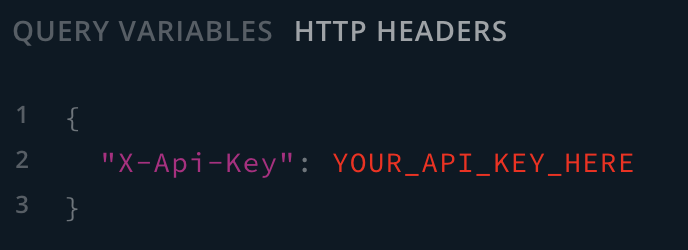
You will have to use a `X-Api-Key` header with your key on every request. For example, on our GraphQL playground, you should test your key as follows:
## Pricing & Rate Limits
In order to make queries with your API key, you must purchase credits. The more complex your queries, the more credits may be used up when requesting data from our API.
| Endpoint | Credit Cost | Rate Limit (per minute) |
| ------------------------ | ----------: | ----------------------: |
| assetBalances | 10 | 20 |
| assets | 1 | 100 |
| assetsPrices | 1 | 100 |
| chains | 1 | 100 |
| credits | 1 | 100 |
| opportunities | 3 | 100 |
| opportunityFarms | 1 | 100 |
| protocolBalance | 10 | 20 |
| protocols | 1 | 100 |
| rekts | 3 | 100 |
| shields | 10 | 20 |
| shieldApprovals | 10 | 20 |
| shieldApprovalsNft | 5 | 20 |
| shieldAdvanced | 5 | 20 |
| scannerLiquidityAnalysis | 10 | 20 |
| scannerHolderAnalysis | 5 | 20 |
| scannerProject | 25 | 20 |
## SDK
We also provide an SDK to facilitate our API's usage if you plan on utilizing it in a Node.js environment. Install it as follows:
`npm i @de-fi/sdk`
The SDK's documentation can be found [**here**](https://www.npmjs.com/package/@de-fi/sdk).
# Brand Assets
Our brand assets can be found in a Google Drive folder [**here**](https://drive.google.com/drive/u/0/folders/1K7urRSWuUUeaDT2LXRovvk6KNwGQ28GQ).